
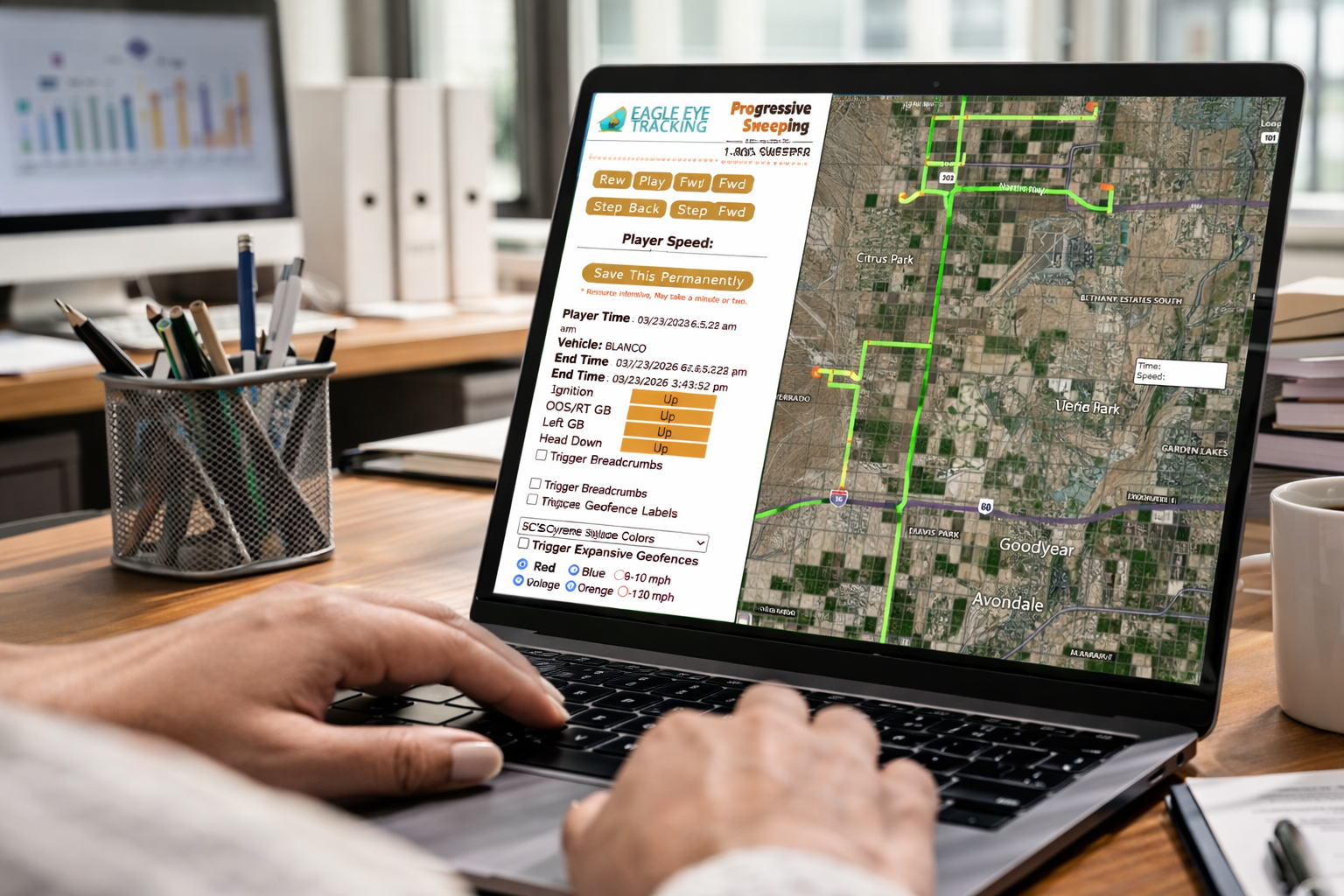
Real-time GPS tracking in street sweeping isn’t about “watching drivers.” It’s about reducing operational gray areas—without relying on memory, paper logs, or after-the-fact guesswork.
When dispatch and supervisors can see what’s happening in the field, teams can:
- Verify streets swept (and where the truck actually operated)
- Respond faster to service requests and complaints with evidence
- Reduce route overlap, deadhead travel, and avoidable idle time
- Standardize performance reviews using consistent definitions of “in-scope” and “excessive.”
- The best systems turn location data into proof-ready records—so your team can operate, coach, and bill with confidence.
This operational mindset comes from Mike Lucht, the founder who built Eagle Eye Tracking to solve real street sweeping execution, verification, and reporting challenges.
Before we define how real-time GPS tracking works, here are the most common questions street sweeping teams ask when they’re trying to improve accountability, reduce disputes, and tighten nightly execution.
Q: How does GPS tracking help prove a street was swept?
A: GPS tracking provides a timestamped route trace and zone context so you can verify where a sweeper traveled and when. Proof improves when route history is paired with geo-fenced service zones and documented exceptions (blocked access, closures, parked cars).
Q: What’s the difference between GPS tracking and route planning?
A: Route planning builds the plan. GPS tracking verifies execution and shows where reality deviated (late changes, blocked access, staffing gaps). In street sweeping, verification often reduces disputes and rework by reliably answering “what happened?”
Q: What should street sweeper tracking software include?
A: Live location, trip/stop history, geofencing, route replay, and exportable reporting—plus workflows for documenting exceptions so “missed” can be recorded as justified when access is blocked.
Q: How do you validate the GPS value in 30 days?
A: Track miles, deadhead time, idle time, in-zone vs out-of-zone time, and complaint-driven revisits. Compare baseline weeks vs tracked weeks using the same zones and service windows.
Now that the “why” is clear, let’s define what real-time GPS tracking is—and what it tracks in a street sweeping operation.
What is GPS Fleet Tracking for Street Sweeeping
Real-time GPS tracking uses live vehicle location and event-based reporting (stops, idle, speed, geofence entry/exit) to monitor route progress and produce proof-of-service records. The goal isn’t perfect visibility—it’s repeatable accountability that reduces disputes, prevents overlap, and improves nightly execution.
In plain terms, it helps dispatch build reliable oversight and proves what was serviced when questions, complaints, audits, or billing reviews arise.
How GPS Tracking Works
A GPS tracker estimates vehicle position using satellite signals and positioning calculations, then transmits data to a platform (often via cellular connectivity) so dispatch and supervisors can view routes, stops, and activity.
In street sweeping, this matters because the location record becomes the foundation for:
- Route replay and route history
- Geofence verification (in-scope vs out-of-scope)
- Proof-of-service reporting and exception documentation
Active vs Passive Tracking
Most fleet tracking systems support:
- Active tracking: real-time location updates for live dispatch visibility
- Passive tracking: stores data and syncs later (useful when coverage is inconsistent)
Street sweeping often benefits from both: live visibility for dispatch decisions, and a complete route history for verification and reporting.
Driver Safety & Performance
Street sweeping fleets don’t just track location—they track the behaviors that create risk and unplanned cost: speeding in transit, harsh braking, rapid acceleration, tight cornering, and long idle periods. A driver behavior management layer turns those events into coachable patterns, so safety conversations are based on consistent rules rather than opinions.
Safety in Numbers (Benchmarks, Not Guarantees)
These figures are commonly cited by telematics/driver-behavior providers and insurance industry commentary as typical outcomes in programs that actively coach drivers. They are not global standards, and results vary by route type, shift conditions, and insurer participation
- Fewer incidents/accidents: Some driver behavior programs report outcomes like ~50% fewer incidents (reported customer average).
- Insurance impact: Some organizations report ~5%–15% insurance discount ranges for telematics-based monitoring where insurers offer credits/discounts.
- Wear & tear/maintenance: Smoother driving can reduce maintenance costs; some programs report ~15% lower maintenance costs as an average outcome.
Why do These Improvements Happen
- Fewer harsh events → fewer collisions and preventable incidents
- Cleaner driving patterns → less brake/tire wear and fewer suspension hits
- Better documentation + coaching → fewer repeated risky behaviors over time
What Real-Time GPS Tracking Improves
1. Proof of service and faster complaint resolution
The most common question is simple: “Was it swept?” GPS tracking supports faster answers by providing:
- Route replay/history to show where a truck traveled and stopped
- Geofence-based scope confirmation (in-zone vs out-of-zone activity)
- Time-based logs that make follow-up calls and escalations easier
2. Geofenced service zones (scope you can prove)
A geofence is a virtual perimeter around a real-world area (neighborhood, corridor, HOA, arterial). When your sweeper enters/exits that boundary, the system can generate alerts/logs—so “in-scope” is defined by geometry, not opinion.
3. Route replay that exposes overlap, deadhead, and “unknowns.”
Route replay makes inefficiency visible:
- Overlap (repeat segments/backtracking)
- Deadhead travel (non-productive miles between zones or back to yard)
- Stops and idle clusters that correlate with delays or route instability
This is particularly important in sweeping because blocked access and late changes are normal, and “what actually happened” matters.
4. More consistent coaching (rules, not opinions)
Tracking platforms commonly include speed, stop time, and trip history—making it easier to standardize “excessive” definitions and coach consistently.
What to Look for in GPS Tracking Software for Street Sweepers
Use this as a practical checklist (and a buying framework):
- Live map view (real-time vehicle location)
- Trip & stop history (what happened + how long)
- Geofence alerts for service zones, yards, and disposal sites
- Route history/replay (for verification + investigations)
- Behavior + idle indicators (speed, idling, stops, after-hours movement)
- Exportable reporting for municipalities, HOAs, and property managers
Street sweeping-specific requirement: your workflow must support exceptions (blocked zones, closures, parked cars) so “missed” can be documented as justified rather than interpreted as failure.
Operational KPIs to Track (Street-Sweeping-Native)
Use these to standardize reviews across routes, drivers, and contractors:
- Curb miles completed (per shift / per zone)
- Route progress monitoring (% of planned zone covered)
- Deadhead miles/time (non-productive movement)
- Idle vs sweeping time ratio
- Stop time inside vs outside zones
- Overlap indicator (repeat segments/backtracking)
- Exceptions count (blocked zones, closures, weather)
- Rework indicators (complaint-driven revisits, repeat service)
- Audit readiness (proof packet completeness rate)
Recommended cadence: daily exception review + weekly KPI trend review (deadhead, idle ratio, overlap/backtracking, in-zone time, complaint close time).
Validating GPS Tracking Value in the First 30 Days
GPS tracking pays off when it reduces gray areas (disputes, rework) and exposes waste (deadhead, idle, overlap) you can actually fix. To validate value in a way operations and finance can trust, compare baseline weeks vs tracked weeks using the same service zones, service windows, and equipment mix.
Step 1: Set a Clean Baseline (Week 0–1)
Pick 1–2 normal weeks and record:
- Routes/zones run
- Service windows and special events (closures, weather)
- Complaint volume and redo work
- Typical shift length range
Step 2: Track 5 Metrics that Prove Improvement (Weeks 2–4)
1. Miles per shift (routing efficiency)
Track total miles per shift and per zone. You’re looking for fewer “mystery miles” caused by overlap, backtracking, and inefficient sequencing.
2. Deadhead time (non-productive travel)
Measure drive time between zones, between stops, and back to the yard—time that burns fuel without sweeping value.
3. Idle time (avoidable waste)
Track idle duration and where it clusters (yard, staging areas, mid-route). Separate necessary idle (traffic/safety) from avoidable idle (waiting on decisions, unclear routing, repeated stops).
4. In-zone vs out-of-zone time (scope control)
Using geofences, compare time spent inside service zones vs outside zones. This is one of the cleanest ways to validate accountability and reduce scope disputes.
5. Complaint-driven revisits and rework (proof-of-service impact)
Track the following:
- Complaint-driven revisits
- Redo sweeps due to uncertainty
- Missed segments (with exception reasons: blocked access, closures, parked cars)
Step 3: Define a “Win”
You don’t need perfection in 30 days—just measurable movement:
- Deadhead and idle trending down
- More consistent in-zone time
- Faster complaint verification
- Fewer revisit/rework triggers
FAQs
Q: What is GPS fleet tracking?
A: Fleet tracking uses GPS to monitor vehicle locations and activity, often using satellite positioning and cellular connectivity to deliver real-time visibility and reporting.
Q: How does GPS tracking determine location?
A: GPS positioning commonly uses trilateration—estimating location using distance measurements from at least three satellites.
Q: What’s the difference between active and passive GPS tracking?
A: Active tracking streams real-time data; passive tracking stores data and uploads later or based on events. Many systems combine both for reliability.
Q: What is a geofence in fleet tracking?
A: A geofence is a virtual perimeter around a geographic zone that can trigger alerts or logs when a vehicle enters or exits.
Q: Why is route replay useful for street sweeping?
A: Route replay helps verify where the vehicle traveled and identify overlap, deadhead, stops, and exception patterns—useful for complaints, audits, and performance reviews.
Q: What features should GPS tracking software include for sweepers?
A: Live tracking, trip/stop history, geofence alerts, route replay, and exportable reporting—plus workflows for documenting exceptions like blocked access.
Q: Does GPS tracking prove a street was swept?
A: It can prove where the truck traveled and when. For sweeping, proof improves when route history is paired with geo-fenced service zones and documented exceptions—so “what happened” is supported by a retrievable record.
Q: What KPIs should municipalities track for street sweeping verification?
A: Curb miles completed by zone/shift, in-zone vs out-of-zone time, exceptions documented, route replay availability by date/zone, complaint closeout time, and rework indicators (complaint-driven revisits, redo sweeps).
Q: What does GPS tracking typically cost?
A: Pricing varies by vendor, features, and hardware requirements. If you’re evaluating options, compare total cost against measurable operational wins you can validate in 30 days (deadhead/idle reduction, faster complaint verification, fewer rework triggers).
Affiliations and Partners
Our affiliation: where excellence meets partnerships

Our network of satisfied clients strengthens our commitment to excellence.

Transform Your Sweeping Operations Now!
0 Comments